Google Ads is one of the most effective ways to get your business in front of people who are actively searching for what you offer. But for many business owners, it feels like a black box. You put money in, things happen, and you are not quite sure whether it is working or whether Google is just taking your money.
This guide explains how Google Ads actually works, in plain English, so you can make informed decisions about whether to use it, how to set it up, and how to tell if it is performing. We manage PPC campaigns for businesses across multiple industries, and the principles in this guide are the same ones we apply to every account.
The Google Ads Auction Explained
Every time someone types a search query into Google, an auction happens. It takes milliseconds, and it determines which ads appear, in what order, and how much each advertiser pays. Understanding this auction is fundamental to understanding Google Ads.
How the auction works
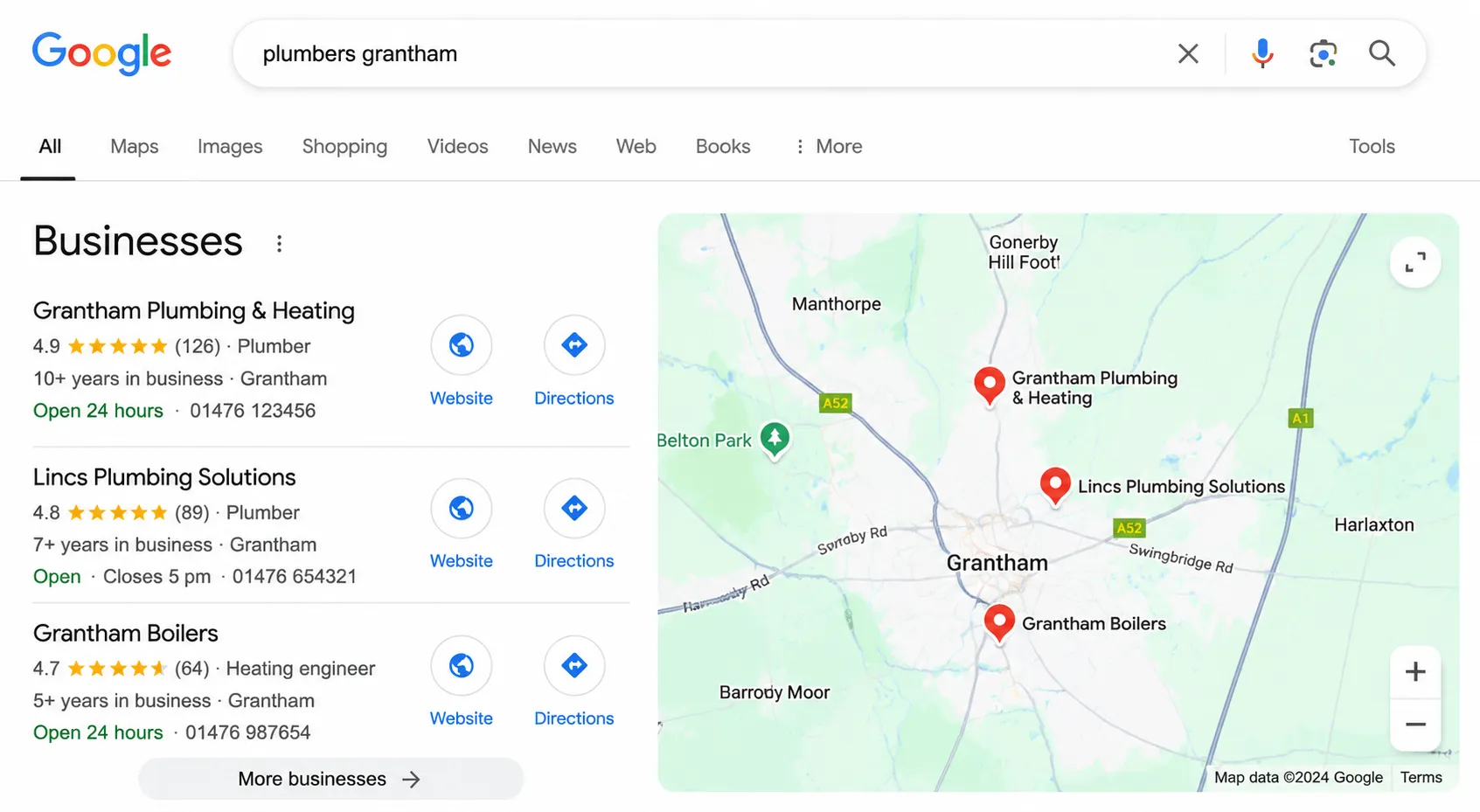
When you search for something like “plumber in Lincoln,” Google identifies all the advertisers who are targeting that keyword (or keywords related to it). Each advertiser has set a maximum bid, which is the most they are willing to pay for a click. But Google does not simply show the ads in order of who bids the most. Instead, it calculates something called Ad Rank.
Ad Rank = Your maximum bid x Your Quality Score x The expected impact of your ad extensions
The advertiser with the highest Ad Rank gets the top position. The second highest gets the second position, and so on. This means that an advertiser with a lower bid but a higher Quality Score can outrank someone who bids more. Google designed it this way because they want to show ads that are actually useful to searchers, not just the ads from whoever has the deepest pockets.
What you actually pay
Here is the part that surprises most people: you do not pay your maximum bid. You pay the minimum amount needed to beat the Ad Rank of the advertiser below you. So if your maximum bid is 5 pounds but you only need 3.20 pounds to maintain your position, you pay 3.20 pounds. This is called a second-price auction (although Google’s current system is slightly more nuanced than a pure second-price model).
This is why Quality Score matters so much. A higher Quality Score means a lower cost per click for the same position. We have seen accounts where improving Quality Score from 5 to 8 reduced cost per click by 30 to 40% without any change in bidding.
Quality Score and Why It Matters
Quality Score is Google’s rating of the quality and relevance of your keywords, ads, and landing pages. It is scored from 1 to 10 at the keyword level, and it directly affects both your ad position and how much you pay per click.
The three components
Quality Score is based on three factors:
- Expected click-through rate (CTR): How likely it is that your ad will be clicked when shown. This is based on your historical CTR for that keyword, adjusted for position. Google compares your CTR to what it expects for ads in that position.
- Ad relevance: How closely your ad copy matches the intent behind the search query. If someone searches “emergency plumber Lincoln” and your ad talks about general home maintenance, your ad relevance will be low.
- Landing page experience: How useful and relevant your landing page is to someone who clicks your ad. This includes page speed, mobile-friendliness, and whether the content on the page matches what the ad promised.
Why it matters commercially
A Quality Score of 7 or above means you are paying less per click than your competitors for the same position. A Quality Score of 4 or below means you are paying a premium. Over the course of thousands of clicks per month, this difference adds up to hundreds or even thousands of pounds.
In our experience managing client accounts, improving Quality Score is often the single highest-return activity you can do. It costs nothing in additional ad spend, but it makes every pound you do spend go further. The most common improvements we make are tightening ad group structure (fewer keywords per ad group), writing more specific ad copy, and improving landing page relevance and speed.
Match Types: Broad, Phrase, and Exact
Match types control which searches can trigger your ads. Getting these right is the difference between showing your ad to people who want what you offer and showing it to people who will never buy from you.
Exact match
Your ad only shows when someone searches for your exact keyword or very close variations (including misspellings, singular/plural forms, and reorderings with the same meaning). If your keyword is [plumber lincoln], your ad will show for “plumber lincoln,” “lincoln plumber,” and “plumber in lincoln,” but not for “cheap plumber near lincoln” or “plumbing supplies lincoln.”
Exact match gives you the most control. It is where we recommend starting for most businesses because you know exactly what you are paying for.
Phrase match
Your ad shows when someone’s search includes the meaning of your keyword. If your keyword is “plumber lincoln,” your ad could show for “emergency plumber lincoln,” “best plumber in lincoln,” or “plumber lincoln reviews.” It will not show for searches that do not include the core concept of plumbing services in Lincoln.
Phrase match gives you broader reach while maintaining reasonable control. We typically add phrase match keywords once exact match campaigns are running well and we want to expand reach.
Broad match
Your ad can show for searches that Google considers related to your keyword, even if the search does not contain any of the words in your keyword. A broad match keyword of “plumber lincoln” could trigger your ad for “boiler repair lincolnshire,” “emergency water leak near me,” or “heating engineer gainsborough.”
Broad match gives you the widest reach but the least control. Google’s algorithm decides what is “related,” and it does not always get it right. We have seen broad match keywords trigger ads for completely irrelevant searches, wasting significant budget. If you use broad match, you need to combine it with Smart Bidding and monitor your search terms report religiously.
Negative keywords
Negative keywords tell Google what not to show your ads for. If you are a premium plumber, you might add “cheap,” “free,” and “DIY” as negatives. If you only serve Lincoln, you might add other cities as negatives. Building and maintaining a negative keyword list is one of the most important ongoing optimisation tasks. We review search terms and add negatives at least weekly for every account we manage.
Bidding Strategies: What to Use and When
Google offers several bidding strategies, and choosing the right one at the right time significantly impacts performance.
Manual CPC
You set a maximum bid for each keyword. This gives you complete control but requires constant monitoring and adjustment. It works well for small accounts where you want to understand exactly what is happening before automating. We often start new accounts on manual CPC for the first 2 to 4 weeks to build baseline data.
Maximise clicks
Google automatically sets bids to get you as many clicks as possible within your budget. This sounds good in theory, but Google will happily spend all your money on cheap clicks that never convert. Use this only for brand awareness campaigns or when you genuinely just want traffic, not leads or sales.
Maximise conversions
Google uses machine learning to set bids that aim to get you the most conversions within your budget. This requires conversion tracking to be properly set up (more on that below) and enough conversion data for Google’s algorithm to learn from. We recommend having at least 30 conversions in the last 30 days before switching to this strategy. Below that threshold, the algorithm does not have enough data and performance can be unpredictable.
Target CPA (cost per acquisition)
You tell Google how much you are willing to pay per conversion, and it adjusts bids to try to achieve that target. This is powerful when it works, but it requires a solid history of conversion data. Set your target CPA based on your actual data, not what you wish it would be. If your average CPA over the last 90 days is 40 pounds, setting a target of 15 pounds will cause Google to dramatically reduce your visibility.
Target ROAS (return on ad spend)
You set a target return on ad spend, and Google adjusts bids accordingly. This is mainly relevant for e-commerce businesses that can track revenue per conversion. If you set a target ROAS of 400%, you are telling Google you want 4 pounds in revenue for every 1 pound spent. Like Target CPA, this needs substantial conversion data to work effectively.
The progression we typically follow with clients is: Manual CPC for the first few weeks, then Maximise Conversions once we have enough data, then Target CPA once we know what a realistic cost per acquisition looks like. Use our PPC ROI calculator to model what your target CPA should be based on your margins and customer value.
Conversion Tracking: Why It Is Non-Negotiable
Conversion tracking tells you what happens after someone clicks your ad. Did they fill out a form? Call your number? Make a purchase? Without this data, you are flying completely blind.
What to track
At minimum, you should track:
- Form submissions: Contact forms, quote request forms, booking forms. Track the thank-you page that appears after submission.
- Phone calls: Google provides call tracking that can attribute phone calls to specific ads and keywords. If phone calls are a significant source of leads, this is essential.
- Purchases (for e-commerce): Track the order confirmation page and pass the transaction value back to Google Ads so you can measure actual revenue per campaign.
How to set it up
The simplest approach is to create conversion actions in Google Ads and install the tracking code using Google Tag Manager. If you are not comfortable with this, it is worth paying someone to set it up correctly. Incorrect conversion tracking is worse than no tracking at all because it gives you false confidence in data that is wrong.
Why we consider it non-negotiable
We will not manage a Google Ads account without proper conversion tracking in place. The reason is simple: without it, we cannot tell which keywords, ads, and campaigns are generating leads and which are wasting money. Every optimisation decision we make is based on conversion data. Without it, we would be guessing, and guessing with your advertising budget is not something we are comfortable doing.
We have taken over accounts from other agencies that had been running for months with no conversion tracking. When we set it up and reviewed the data, we found that 40 to 60% of the budget was being spent on keywords that generated clicks but never a single enquiry. That is not unusual. It is what happens when you optimise for clicks instead of conversions.
How to Read Your Google Ads Reports
Google Ads provides an enormous amount of data, but most of it is noise. Here are the metrics that actually tell you whether your campaigns are working.
The metrics that matter
- Cost per conversion (CPA): How much you pay for each lead, enquiry, or sale. This is the most important metric. If your CPA is lower than your profit per customer, your campaigns are profitable.
- Conversion rate: The percentage of clicks that become conversions. A healthy conversion rate for most industries is 3 to 8%. Below 2% usually indicates a problem with your landing page or your keyword targeting.
- Click-through rate (CTR): The percentage of people who see your ad and click it. Search ads should aim for a CTR above 3%. Below 2% suggests your ad copy is not compelling or your keywords are not well-matched to your ads.
- Quality Score: As discussed above. Monitor this at the keyword level and prioritise improving any keywords below 6.
- Search terms report: This shows you the actual search queries that triggered your ads. Review this weekly. It reveals irrelevant searches you need to add as negatives and valuable search terms you might want to target explicitly.
Metrics that can be misleading
- Impressions: How many times your ad was shown. High impressions mean nothing if nobody is clicking or converting.
- Average position (now “impression share”): Being in position 1 is not always best. Sometimes position 2 or 3 gives you a better CPA because the clicks are cheaper and the conversion rate is similar.
- Total clicks: More clicks is only good if those clicks are converting. We would rather have 50 clicks that generate 5 leads than 200 clicks that generate 2.
How often to review
We recommend checking your account at least weekly, with a deeper analysis monthly. Look for trends rather than reacting to individual days. A single bad day does not mean your campaign is broken, just as a single good day does not mean you have cracked it. Look at rolling 7-day and 30-day averages to smooth out natural variation.
You can use our Google Ads budget calculator to model different spend levels and see what results you might expect based on your industry benchmarks.
Google Ads is a powerful tool when used properly. The businesses that get the best results are the ones that understand how the system works, track everything, and make decisions based on data rather than gut feeling. If you want help getting your campaigns set up correctly from the start, or if you are running campaigns that are not delivering the results you expected, our PPC management team is here to help.