What a Meta Description Actually Does
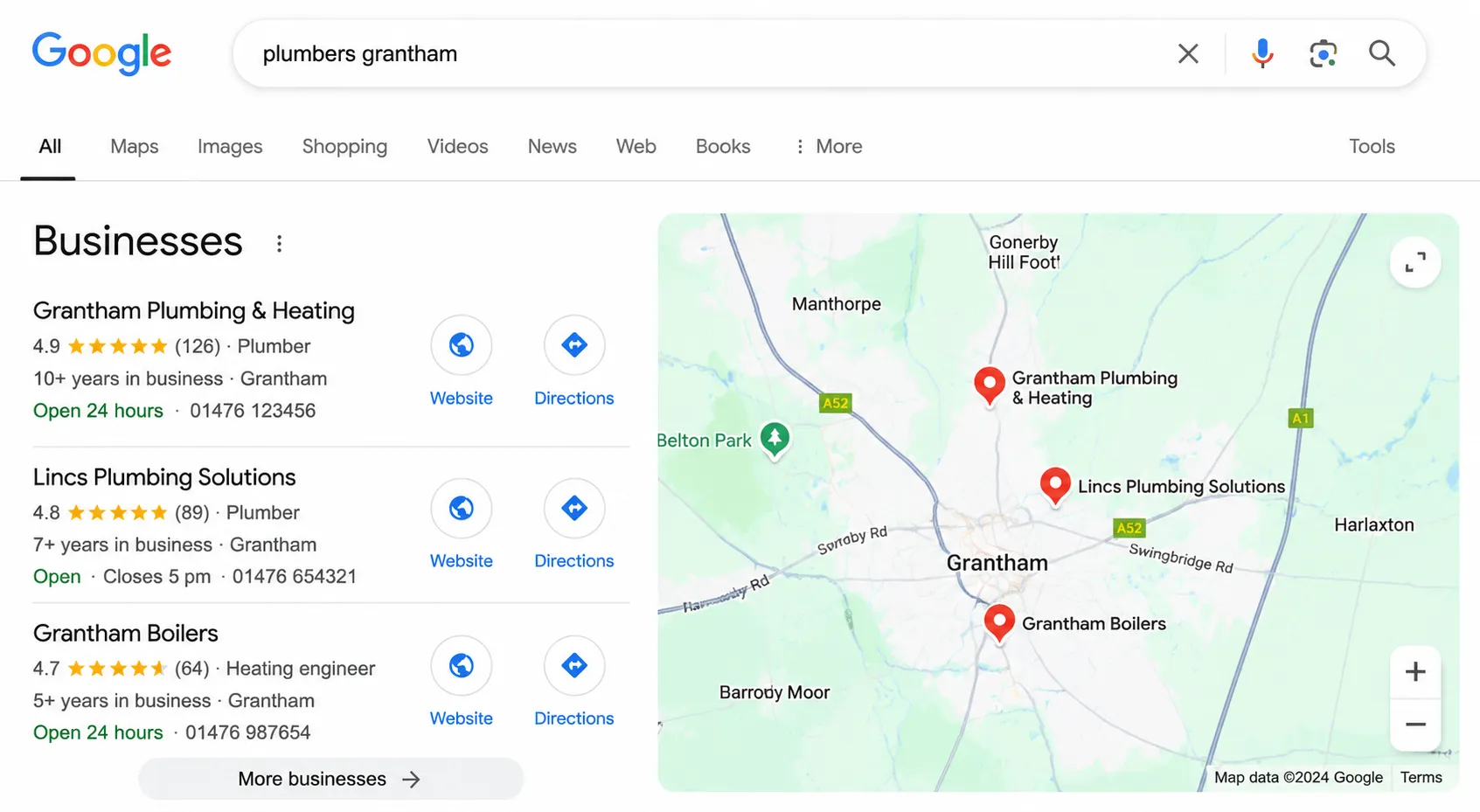
A meta description is the short snippet of text that appears below your page title in Google search results. It is your 155-character sales pitch. When someone searches for something and sees ten results on the page, your meta description is what convinces them to click on your link rather than a competitor’s.
Let us be clear about something important: meta descriptions are not a direct ranking factor. Google has confirmed this repeatedly. Writing a great meta description will not move you from position 8 to position 3. What it will do is increase your click-through rate (CTR), which means more visitors from the same ranking position. And there is growing evidence that a higher CTR can indirectly improve rankings over time, because Google interprets clicks as a signal of relevance.
In our SEO work, we have seen CTR improvements of 15% to 30% from rewriting meta descriptions alone, with no other changes to the page. On a page getting 1,000 impressions per month, a 20% CTR improvement means 200 extra visitors for zero additional effort. That is why we treat meta descriptions as a genuine optimisation opportunity, not an afterthought.
There is another function that meta descriptions serve: they set expectations. A good description tells the searcher exactly what they will find on the page. This reduces bounce rates because people who click through know what they are getting. A misleading or vague description might get clicks, but those visitors will leave immediately, which helps nobody.
The Right Length for a Meta Description and Why It Matters
Google displays approximately 155 to 160 characters of a meta description on desktop and around 120 characters on mobile. These are not exact limits because Google measures by pixel width rather than character count, but they are reliable guidelines.
Our recommended target: 120 to 155 characters.
Here is why we recommend this range rather than always maxing out at 155:
- Under 70 characters: Too short. You are leaving space in the search results that a competitor could be using to communicate their value. Google may also decide your description is not useful enough and rewrite it.
- 70 to 119 characters: Acceptable but not ideal. You can get your point across but you are missing an opportunity to include a call to action or additional detail.
- 120 to 155 characters: The sweet spot. Enough space to describe the page, include a keyword, and add a compelling reason to click. Displays fully on both mobile and desktop in most cases.
- 156 to 300 characters: Will be truncated on desktop and significantly cut on mobile. The trailing “…” can look unpolished. Some SEOs write longer descriptions hoping Google will show the relevant portion, but you lose control of the message.
Use our free meta title and description checker tool to see exactly how your description will appear in search results before you publish it. It shows you the pixel width and character count so you can fine-tune the length.
How to Write a Meta Description: A Practical Formula
After writing thousands of meta descriptions for client pages across dozens of industries, we have developed a simple formula that consistently produces good results. Every effective meta description contains three elements.
Element 1: What the Page Offers
Start by clearly stating what the page is about and what the visitor will get from it. This should align with the search intent. If someone is searching “how to write a meta description”, they want to learn how to do it. Your description should confirm that your page teaches them.
Be specific. “Learn about meta descriptions” is vague. “Step-by-step guide to writing meta descriptions that increase click-through rates” is specific and immediately communicates value.
Element 2: Why Your Page Is the Best Result
This is where you differentiate from the other nine results on the page. What makes your page worth clicking? Include a credibility signal. This could be your experience (“from an agency that manages SEO for 40+ businesses”), a content promise (“with real before-and-after examples”), or a unique feature (“includes a free checker tool”).
Element 3: A Reason to Click Now
End with something that motivates the click. This does not need to be aggressive or salesy. It could be as simple as “Read the full guide” or “See the checklist”. The point is to give the searcher a clear next action rather than letting the description just trail off.
The Formula in Practice
Here is how the three elements combine: [What you will get] + [why this source] + [action prompt]
Example: “Learn how to write meta descriptions that improve click-through rates. Practical tips from a working SEO agency, with real examples. Free checker tool included.”
That is 148 characters. It tells you what you will learn, establishes credibility, and mentions a bonus resource. It includes the target keyword naturally. And it fits within the display limit.
How to Include a Call to Action in Your Meta Description
A call to action (CTA) in a meta description is not the same as a CTA on a landing page. You are not asking someone to buy or sign up. You are asking them to click through to your page. The CTA should create a sense of completion or curiosity.
Effective meta description CTAs:
- “Read the full guide.” – Simple and direct.
- “See the complete checklist.” – Promises a comprehensive resource.
- “Find out which approach works best.” – Creates curiosity.
- “Get your free quote in 60 seconds.” – For commercial pages, specific and time-bound.
- “Compare pricing and features.” – For comparison pages, matches intent.
CTAs to avoid:
- “Click here!” – Generic and adds nothing.
- “Buy now!” – Too aggressive for a search result.
- “You won’t believe what happens next.” – Clickbait erodes trust.
- “Best product ever. Buy today!” – Salesy and not credible.
The best CTAs match the search intent. For informational queries, use learning-oriented CTAs. For commercial queries, use action-oriented ones. For local queries, include location and ease of contact. This alignment between intent and CTA is something we focus on heavily in our SEO services.
Common Meta Description Mistakes and How to Avoid Them
We audit hundreds of websites every year, and the same meta description mistakes come up repeatedly. Here are the ones we see most often and what to do instead.
Mistake 1: No Meta Description at All
If you do not write a meta description, Google will generate one for you by pulling text from the page. Sometimes this works fine. Often, it pulls a random sentence that makes no sense out of context, or it grabs your cookie notice, or it shows navigation text. You lose all control over your message in search results.
Fix: Write a unique meta description for every page that targets a keyword. At minimum, cover your homepage, service pages, and any page you want to rank for specific terms.
Mistake 2: Keyword Stuffing
We still see descriptions like: “Best meta description tips. Meta description guide. How to write meta descriptions. Meta description examples.” This reads terribly, does not convince anyone to click, and Google may ignore it entirely in favour of generating its own.
Fix: Include your primary keyword once, naturally. If a secondary keyword fits naturally, include it. If it does not, leave it out. Readability always comes first.
Mistake 3: Describing Your Company Instead of the Page
“Codesky is a digital marketing agency based in Lincolnshire offering SEO, PPC, and web design services.” That might work for a homepage, but it is useless as a description for a blog post about meta descriptions. The description should tell the searcher what this specific page offers them.
Fix: Focus on the page content and the benefit to the reader. What will they learn or gain from this specific page?
Mistake 4: Being Too Vague
“Everything you need to know about meta descriptions.” This says nothing specific. It does not tell me what angle the content takes, what I will actually learn, or why this guide is better than the other ten results. It is the meta description equivalent of a beige wall.
Fix: Replace vague promises with specific ones. “Step-by-step formula for writing meta descriptions, with 6 before-and-after examples and a free length checker tool.”
Mistake 5: Duplicating Descriptions Across Pages
Using the same meta description on multiple pages, or using a template like “[Page Title] – Welcome to our website. We offer great services.” This is a waste. Every page serves a different purpose and targets different queries. The description should reflect that.
Fix: Write a unique description for each page. If you have hundreds of pages, prioritise the ones that get the most impressions in Search Console.
Meta Description Examples: Before and After
Theory is useful, but seeing the principles applied to real examples makes them concrete. Here are five before-and-after rewrites based on patterns we encounter in client audits.
Example 1: Local Service Page
Before: “We are a plumbing company based in Lincoln. We offer all plumbing services. Call us today.”
53 characters. Too short, no specific value, generic CTA.
After: “Emergency and scheduled plumbing services across Lincoln. Fixed pricing, same-day callouts, and a 12-month guarantee on all work. Get a free quote.”
149 characters. Specific services, trust signals (fixed pricing, guarantee), clear CTA.
Example 2: Blog Post
Before: “Read our latest blog post about website speed and how it affects your business.”
80 characters. Vague, does not specify what the reader will learn.
After: “Why website speed matters for conversions and rankings, with 7 practical fixes you can apply today. Based on data from 200+ site audits.”
139 characters. Specific promise (7 fixes), credibility signal (200+ audits), actionable.
Example 3: Product Category Page
Before: “Browse our range of products. We have everything you need. Shop now!”
69 characters. Could describe literally any ecommerce site.
After: “Handmade oak dining tables in 6 sizes, from 4-seater to 12-seater. Free delivery across the UK. Lead time 4 to 6 weeks. View the full collection.”
149 characters. Specific product details, practical information (delivery, lead time), clear CTA.
Example 4: Service Page
Before: “Codesky offers SEO services to help your business grow online. Contact us to learn more.”
89 characters. Company-focused, vague benefit.
After: “SEO services that focus on rankings, traffic, and leads, not vanity metrics. Transparent monthly reporting and no long-term contracts. See our approach.”
153 characters. Specific differentiators, addresses common concerns, invites exploration.
Example 5: Homepage
Before: “Welcome to our website. We are a digital agency.”
49 characters. Tells the searcher nothing useful.
After: “Lincolnshire web design and digital marketing agency. We build websites that generate leads and run SEO and PPC campaigns that deliver measurable results.”
155 characters. Location, services, specific outcomes.
Use Our Free Meta Description Checker Tool
We have built a free meta title and description checker that shows you exactly how your meta description will appear in Google search results. It displays the pixel width, character count, and a visual preview so you can see if your description will be truncated.
The tool also checks your meta title at the same time, so you can optimise both elements together. It is completely free, requires no sign-up, and runs entirely in your browser.
Here is how to use it effectively:
- Enter your meta title and description.
- Check the character count. Aim for 120 to 155 characters for the description.
- Look at the visual preview. Does it read well? Does it cut off awkwardly?
- Check that your primary keyword appears naturally.
- Read it from the searcher’s perspective. Would you click on this result?
If you are working through your site’s meta descriptions systematically, start with the pages that get the most impressions in Google Search Console. These are the pages where an improved CTR will have the biggest absolute impact on traffic. Even a small percentage increase in CTR on a page with 10,000 monthly impressions translates to hundreds of extra visitors.
Writing Meta Descriptions at Scale
If you have a large website with hundreds or thousands of pages, writing individual meta descriptions for every page is not practical. Here is how we approach it for clients with larger sites.
Tier 1: Write individually. Your homepage, main service pages, key landing pages, and top 20 pages by impressions. These get custom, hand-crafted descriptions.
Tier 2: Use smart templates. For category pages, product pages, or location pages, create a template that pulls in dynamic data. For example: “[Product name] – [key feature]. [Price] with free delivery. View details and order online.” This gives each page a unique description without writing each one from scratch.
Tier 3: Leave blank intentionally. For very low-traffic pages like tag archives or deep pagination pages, it is sometimes better to let Google generate the description. Google may pull a more relevant snippet than a generic template would provide.
This tiered approach is something we implement as part of our SEO services. It ensures the pages that matter most get the most attention, while still providing coverage across the entire site.