SEO can feel overwhelming when you are running a small business and trying to do everything yourself. There are thousands of articles online, most of them either too basic to be useful or too technical to follow. This checklist sits in the middle. It covers everything a small business in the UK actually needs to have in place, prioritised by impact so you can work through it systematically.
We use a version of this checklist with every new SEO client we onboard. It covers the fundamentals that, in our experience, account for roughly 80% of the results most small businesses need.
Technical SEO Basics: What to Check First
Technical SEO is the foundation. If these items are not in place, everything else you do will be less effective. The good news is that most of these are one-time fixes.
SSL certificate (HTTPS)
Your website must use HTTPS. This has been a ranking factor since 2014, and browsers now flag HTTP sites as “not secure.” Most hosting providers offer free SSL certificates through Let’s Encrypt. If your site still shows HTTP, this is the first thing to fix. It takes 10 minutes with most hosts.
Mobile responsiveness
Google uses mobile-first indexing, which means it primarily uses the mobile version of your site for ranking. Open your website on your phone. Can you read the text without zooming? Do buttons work without accidentally tapping the wrong one? Does the navigation function properly? If the answer to any of these is no, your mobile experience needs attention.
Page speed
Run your homepage through Google PageSpeed Insights (pagespeed.web.dev). You want a score of at least 70 on mobile, ideally above 85. The most common issues we see with small business websites are uncompressed images, no browser caching, render-blocking CSS and JavaScript, and cheap shared hosting that responds slowly. In our experience, switching to a quality hosting provider and compressing images properly will fix 60 to 70% of speed issues.
XML sitemap
Your site needs an XML sitemap submitted to Google Search Console. This helps Google discover and index all your pages. If you are on WordPress, plugins like Yoast SEO or Rank Math generate this automatically. Check yours by visiting yoursite.co.uk/sitemap.xml. If nothing appears, your SEO plugin may not be configured correctly.
Robots.txt
Check yoursite.co.uk/robots.txt. This file tells search engines what they can and cannot crawl. The most common mistake we see is sites that accidentally block Google from crawling important pages, often left over from when the site was in development. Make sure it is not blocking anything you want indexed.
Google Search Console
If you have not already, set up Google Search Console and verify your site. This is free and gives you direct insight into how Google sees your website, including indexing issues, search queries that trigger your site, click-through rates, and any errors that need fixing. We check this tool weekly for every client we work with.
Google Business Profile Essentials
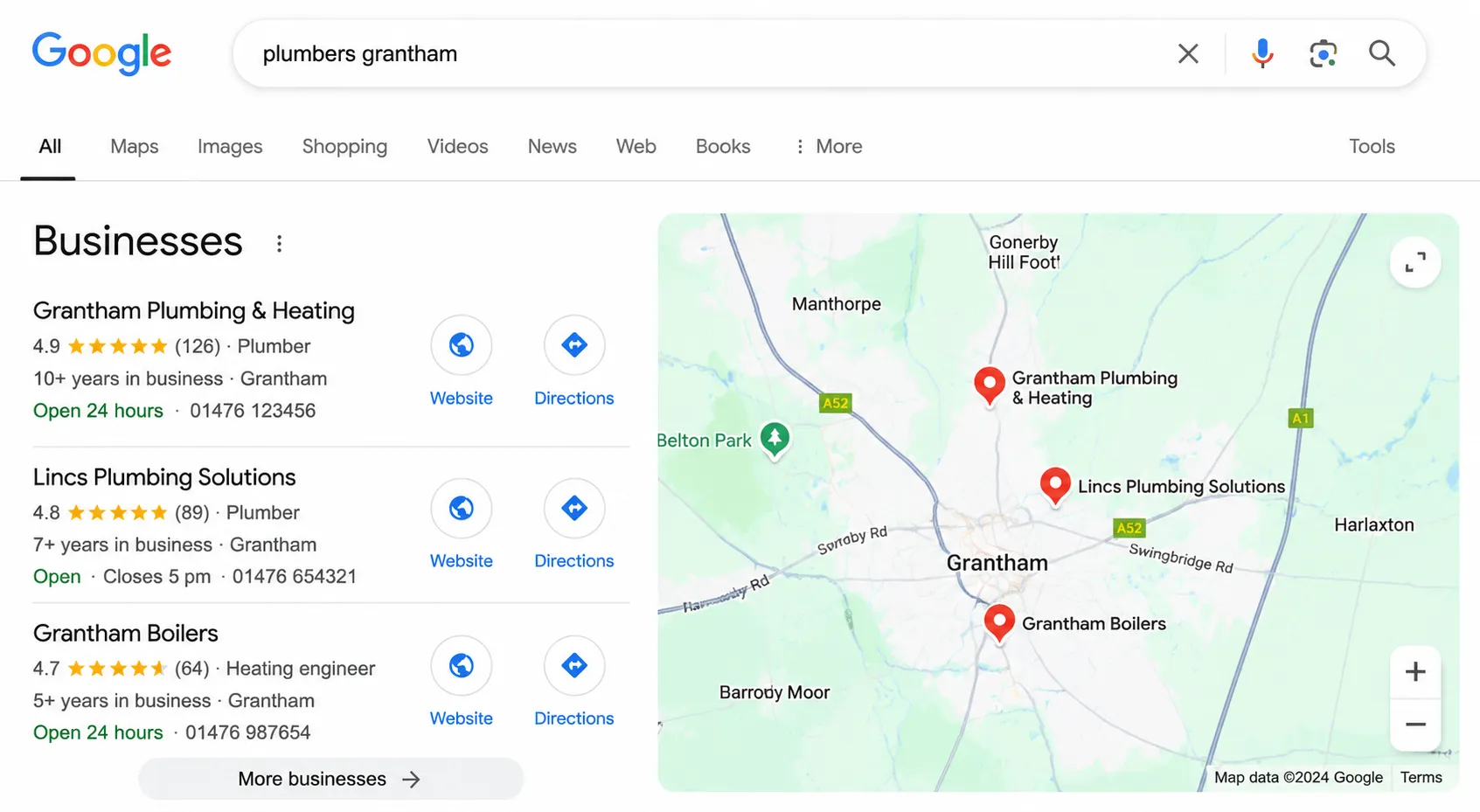
For any business that serves a local area, Google Business Profile (formerly Google My Business) is arguably the most important SEO asset you have. It directly determines whether you appear in map results and the local pack, which is the box of three businesses that appears at the top of local search results.
Claiming and verifying your profile
Go to business.google.com and either claim your existing listing or create a new one. Google will verify your business, usually by sending a postcard with a PIN to your address. This takes 5 to 14 days. Do not skip this step. An unverified profile will not appear in search results.
Completing every section
Google rewards complete profiles. Fill in every available field:
- Business name (exactly as it appears in the real world, no keyword stuffing)
- Primary and secondary categories (choose the most specific options available)
- Address and service area
- Phone number and website URL
- Opening hours, including special hours for bank holidays
- Business description (750 characters, use your target keywords naturally)
- Products and services with descriptions and prices where applicable
- Attributes (accessible, free Wi-Fi, appointment required, etc.)
Photos and regular updates
Businesses with photos get 42% more requests for directions and 35% more click-throughs to their website according to Google’s own data. Upload high-quality photos of your premises, your team, your work, and your products. Add new photos at least monthly. We also recommend posting regular updates through the “Posts” feature, which lets you share offers, news, and events directly on your profile.
Reviews
Reviews are one of the strongest local ranking factors. Ask satisfied customers to leave a Google review. Make it easy by creating a direct link (search “Google review link generator” to create one). Respond to every review, positive and negative. When responding to negative reviews, be professional and solution-oriented. We have seen businesses improve their local rankings noticeably within 2 to 3 months simply by getting consistent, genuine reviews.
On-Page SEO Fundamentals
On-page SEO covers everything on your actual website that helps search engines understand what your pages are about and whether they are relevant to specific searches.
Title tags
Every page on your site needs a unique title tag under 60 characters that includes your primary keyword for that page. Your homepage title might be “Website Design Agency in Lincolnshire | Your Business Name.” Your services page might be “Professional Plumbing Services in Lincoln | Your Business Name.” Use our meta title checker to test your titles before publishing.
Meta descriptions
Write a unique meta description for every page, under 160 characters. This does not directly affect rankings, but it heavily influences whether people click on your result. Include your keyword, a clear benefit, and if possible, a call to action. Think of it as a tiny advertisement for that page.
Heading structure
Use one H1 per page that includes your primary keyword. Use H2s for main sections and H3s for subsections. This creates a logical hierarchy that helps both users and search engines understand your content. Do not skip heading levels (going from H1 to H3 without an H2), and do not use headings purely for styling.
Content quality and depth
Each page needs enough content to properly cover its topic. For service pages, we typically recommend at least 500 to 800 words. For blog posts and guides, 1,000 to 2,000 words tends to perform well. But word count alone is meaningless. The content needs to genuinely answer the questions your potential customers are asking. We have seen 600-word pages outrank 3,000-word articles because the shorter page answered the search intent more directly.
Internal linking
Link between your own pages where it makes sense. Your service pages should link to relevant blog posts. Your blog posts should link back to your service pages. Your homepage should link to your most important pages. Internal linking helps Google understand your site structure and distributes ranking authority across your pages. Aim for 3 to 5 internal links per page as a starting point.
Image optimisation
Every image should have a descriptive alt tag that explains what the image shows. Compress images before uploading (use tools like TinyPNG or ShortPixel). Use descriptive file names like “lincoln-cathedral-view.jpg” rather than “IMG_4523.jpg.” Images are often the single biggest contributor to slow page speeds, and optimising them is one of the easiest wins available.
Local Citations and NAP Consistency
NAP stands for Name, Address, Phone number. Consistency across the web is a local ranking factor that many small businesses overlook.
What is a citation?
A citation is any online mention of your business name, address, and phone number. This includes directory listings (Yell, Thomson, FreeIndex), social media profiles, industry-specific directories, and any other website that lists your business details.
Why consistency matters
If your business is listed as “Smith & Sons Plumbing” on your website, “Smith and Sons Plumbing Ltd” on Yell, and “Smiths Plumbing” on Facebook, Google treats these as potentially different businesses. This confusion weakens your local SEO. Every listing should use exactly the same business name, address format, and phone number.
Priority citations for UK businesses
Start with these directories. In our experience, getting these right covers the most important citation sources for UK small businesses:
- Google Business Profile (already covered above)
- Bing Places for Business
- Apple Maps (via Apple Business Connect)
- Yell.com
- Thomson Local
- FreeIndex
- Yelp
- Facebook Business Page
- Companies House (if applicable, ensure details match)
- Industry-specific directories relevant to your sector
Auditing your existing citations
Search for your business name in Google and check the first three pages of results. Note every directory listing you find and check that the NAP information is correct and consistent. Fix any discrepancies. This is tedious work, but it has a genuine impact on local rankings. We typically spend 2 to 3 hours on citation cleanup when we take on a new SEO client in Lincolnshire, and it is always time well spent.
Getting Your First Backlinks
Backlinks are links from other websites to yours. They remain one of the strongest ranking factors in Google’s algorithm. For small businesses, building backlinks can feel daunting, but there are practical, legitimate approaches that work.
Start with what you already have
Think about your existing business relationships. Suppliers, partners, trade associations, local business groups, charities you support. Many of these will have websites with partner or member pages. Reach out and ask if they will add a link to your site. These are some of the easiest and most valuable backlinks you can get because they come from relevant, trusted sources.
Local press and publications
Local newspapers and business publications are always looking for stories. If you have won an award, launched a new service, hired new staff, or done something newsworthy in your community, send a press release. The resulting article will usually include a link to your website. We have clients who get 3 to 5 quality local backlinks per year just from sending occasional press releases about genuine business news.
Create content worth linking to
The most sustainable way to earn backlinks is to publish content that other people find useful enough to reference. This could be original research, a comprehensive guide (like this one), an industry report, or a free tool. Think about what information would be valuable to your industry or local community, and create it. Over time, other websites will naturally link to it.
What to avoid
Do not buy backlinks. Do not use link farms or private blog networks. Do not submit your site to hundreds of low-quality directories. Google is sophisticated enough to detect manipulative link building, and the penalties can be severe, potentially removing your site from search results entirely. Focus on earning links from genuine, relevant sources, even if the process is slower.
What to Track and How Often
SEO without measurement is guesswork. Here is what to monitor and how frequently.
Weekly checks
- Google Search Console: Check for crawl errors, indexing issues, and any manual actions. Review your top search queries and see if anything has changed significantly.
- Google Business Profile insights: Monitor views, searches, direction requests, and phone calls. Look for trends rather than individual data points.
Monthly reviews
- Organic traffic: In Google Analytics, check your organic search traffic. Is it trending up, down, or flat? Compare month-on-month and year-on-year to account for seasonal variation.
- Keyword rankings: Track your primary keywords using a tool like SEMrush, Ahrefs, or the free version of Ubersuggest. Focus on trends rather than daily fluctuations. Rankings move around naturally, so look at the direction over weeks and months.
- Conversions from organic traffic: This is the metric that actually matters. How many enquiries, phone calls, or sales are coming from organic search? If traffic is going up but conversions are not, you are attracting the wrong visitors or your website is not converting well.
Quarterly analysis
- Content performance: Which pages are generating the most traffic and conversions? Which are underperforming? Use this data to decide where to invest your time next.
- Competitor review: Check what your competitors are doing. Have they published new content? Have they gained new backlinks? Are they ranking for keywords you have not targeted yet? This helps you stay aware of the competitive landscape and identify opportunities.
- Technical health check: Run your site through Google PageSpeed Insights and Search Console again. Technology degrades over time. Plugins update, images get added without compression, new pages get created without proper SEO. A quarterly technical review catches problems before they compound.
This basic SEO checklist covers the fundamentals that every small business should have in place. Work through it methodically, and you will be ahead of the majority of your competitors who are either ignoring SEO entirely or doing it haphazardly. If you want professional help implementing any of this, our SEO services are designed specifically for businesses that want to grow their organic traffic without the jargon and mystery.